You may or may not know this, but the KeyReporter map drawing tools include a little-known feature that can be useful when (re)arranging classrooms and labs to meet new social distancing requirements.
When you enter floorplan editing mode, just look for the measuring tape icon in the top right corner, click it, and then click and drag between desk objects on the map for a measurement. Click again to turn the measuring tool off and adjust the desks as needed.
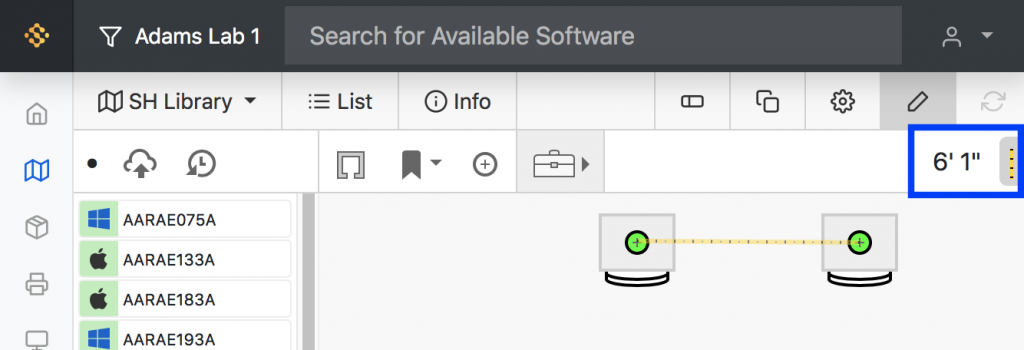
This tool is obviously only as precise as your room and desk measurements, and most useful when your floorplan is built to scale, so don’t be fooled. Use it while trying out different layouts during the planning stage, and double-check the measurements when it comes time to rearrange the room.
And don’t forget that you can add new tabs to the Maps page in KeyReporter. You don’t have to destroy any of the floorplans you’ve previously drawn just to try out this feature.
As always, let us know if you have any trouble, questions, or feedback!


Subscribe


Subscribe:
Follow:


 See K2 First-hand:
Follow: